Mastering Feature Flags in Production: Strategy, Tooling, and Lifecycle Governance
A practical guide on architecting feature flag systems across Local, Dev, and Prod environments, including clean-up strategies to prevent technical debt.
The Core Paradigm: Decoupling Deployment from Release
In many software organizations, deploying software to production and releasing a feature to users are treated as the exact same event. This coupling creates high-stakes deployment windows, long-lived release branches that are painful to merge, and full-rollback scenarios whenever an edge case surfaces.
Modern engineering teams eliminate this risk by separating the two concepts:
- Deployment: The operational process of building, testing, containerizing, and running new code on production infrastructure.
- Release: The runtime decision of exposing that new capability to specific users, targeted cohorts, or internal testers.
Feature flags serve as the runtime control layer that makes this separation possible. When implemented correctly, feature flags enable continuous delivery, targeted rollouts, and instant operational kill switches that contain failures with zero downtime.
Why and How We Use Feature Flags
Feature flags are not just binary switches; they fall into distinct architectural categories with different lifespans and scopes:
1. Release Flags (Short-Lived)
Release toggles allow incomplete features to merge into the main branch continuously behind an inactive flag. When ready for production, exposure is expanded in phases:
- Internal Testing: Engineers and internal team members test the feature live in production.
- Targeted Beta Users: Specific customer accounts, organization IDs, or beta testers get early access.
- General Release: Feature is enabled for all users after verifying stability and performance.
2. Operational and Circuit Breaker Flags (Long-Lived)
Operational flags act as dynamic kill switches for resource-heavy subsystems. If a downstream vendor API degrades or database CPU spikes, operators can instantly toggle off non-critical functionality (such as background recommendations or AI autocomplete) without restarting pods or rolling back releases.
3. Permission and Entitlement Flags (Medium-to-Long Lived)
Used to gate features based on enterprise tier, region, or organizational account status (for example, enterprise SSO or custom webhooks).
4. Experimentation Flags (Medium-Lived)
Flags that split user traffic across different feature variants to evaluate user behavior and system performance.
The Environment Strategy: Local vs Dev vs Production
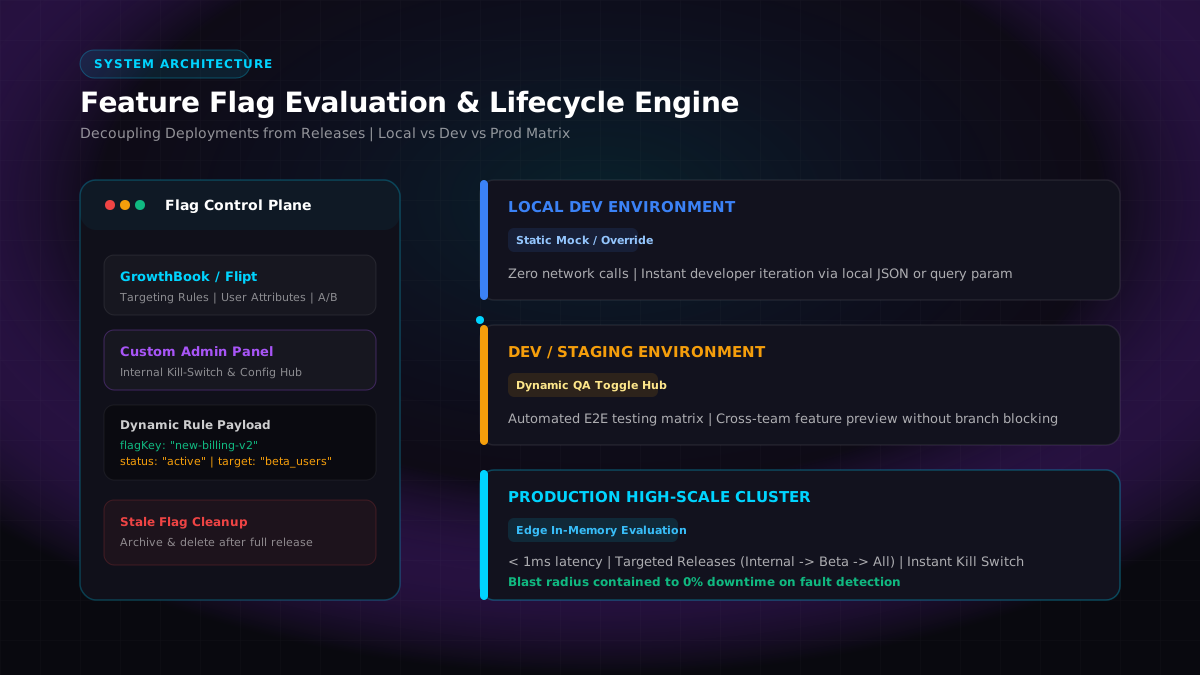
Treating flag evaluations identically across all environments is a common mistake. Each layer of your development lifecycle demands a tailored evaluation strategy:
| Dimension | Local Development | Dev / Staging | Production Cluster |
|---|---|---|---|
| Primary Goal | Fast developer iteration with zero external dependencies | QA test matrix and cross-team previews | Sub-millisecond latency and zero blast radius |
| Data Source | Local JSON, environment variables, or URL overrides | Centralized toggle admin hub | In-memory edge cache with SSE push |
| Network Cost | 0 ms (In-process resolution) | 5 to 20 ms (Shared dev service) | < 0.2 ms (In-memory local evaluation) |
| Blast Radius | Isolated to single developer machine | Isolated to staging environment | Strictly gated by targeted user attributes or environment |
1. Local Environment Strategy
Local development should never depend on live production flag networks or external authentication credentials to run. Use deterministic local overrides:
typescriptexport function resolveLocalFeatureFlag(key: string, userContext?: UserContext): boolean {
if (process.env.NODE_ENV === 'development') {
const urlOverride = getQueryParamOverride(key);
if (urlOverride !== null) return urlOverride;
if (key in localFlagOverrides) {
return Boolean(localFlagOverrides[key]);
}
}
return false;
}
2. Dev and Staging Environment Strategy
In staging, QA engineers and automated tests need to evaluate both branches of the conditional logic. Integration test runners (Playwright, Cypress) can pass custom headers so end-to-end suites execute full regression matrices with flags explicitly turned ON and OFF.
3. Production Environment Strategy: In-Memory Edge Evaluation
In production, your request path must never make a blocking HTTP round-trip to an external flag service. Doing so adds unnecessary latency and introduces an external point of failure.
Production SDKs maintain an in-memory rule engine that syncs rule sets via Server-Sent Events (SSE) or background polling. Evaluation happens locally against the in-memory payload in sub-millisecond time (< 0.2ms).
Tooling: GrowthBook, Flipt, and Custom Admin Panels
Having evaluated and managed feature flags across production systems, here is how the tooling stacks up for feature flag evaluation and control:
GrowthBook
GrowthBook provides a clean, self-hostable control plane for managing feature flags:
- Visual UI for defining flag targeting rules and user attribute conditions.
- Client and server SDKs with in-memory caching and real-time streaming updates.
- Useful for engineering teams wanting an intuitive interface for flag management without building one from scratch.
Flipt
Flipt is an open-source, high-performance feature flag solution designed for microservices:
- Built in Go with support for gRPC and OpenFeature standards.
- Supports GitOps workflows where flag definitions can be stored directly in version control.
- Well-suited for backend architectures needing lightweight, low-latency flag evaluation.
Custom In-House Admin Control Panel
When working with bespoke multi-tenant enterprise systems, we frequently build a custom internal admin control panel:
text+----------------------------------------------------------+ | Custom Admin Control Plane | | [Toggle: ON/OFF] [Target: Beta Users] [Kill-Switch] | +----------------------------+-----------------------------+ | (Websocket / SSE Push) v +----------------------------------------------------------+ | Distributed Redis / DynamoDB State | +----------------------------+-----------------------------+ | (Cache Sync < 100ms) v +----------------------------------------------------------+ | In-Memory Application SDK (Go / Node.js / React) | | Local Evaluation: < 0.2ms per req | +----------------------------------------------------------+
Key architectural requirements for custom control panels:
- Audit Logs and RBAC: Every toggle change must record who flipped the switch, why (linking to a Jira ticket or incident ID), and the exact previous state.
- User Segmentation: Filter flags by user attributes, email domains, or organization IDs.
- Fail-Safe Defaults: If the control plane or caching tier is unreachable, the system must fall back to a hardcoded default boolean without throwing runtime exceptions.
Real-Time Dynamic Toggling: Visual Breakdown
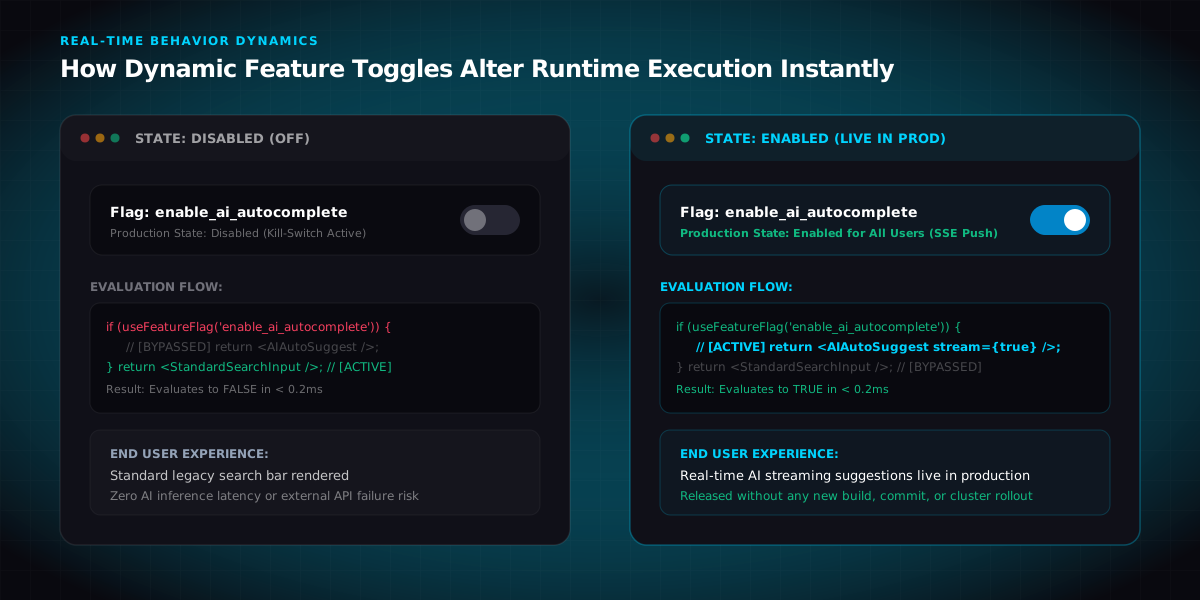
The diagram below illustrates how toggling a flag in the admin plane dynamically changes production execution flows and user experiences in real time without deployment:
Code Implementation Example
typescriptimport { useFeatureFlag } from '@/data/hooks/flags';
export function SearchExperience() {
const isAiAutocompleteEnabled = useFeatureFlag('enable_ai_autocomplete', {
defaultValue: false,
});
if (!isAiAutocompleteEnabled) {
return <StandardSearchInput placeholder="Search catalog..." />;
}
return <AIStreamingSearchInput model="gemini-flash" autoSuggest={true} />;
}
Governance: When to Use Flags vs When NOT to Use Them
Feature flags introduce conditional complexity. Unchecked usage turns a clean codebase into a tangled maze of dead branches.
When to Use Feature Flags
- High-Risk Architectural Refactors: Migrating an ORM, database driver, or payment provider behind a shadow-read flag.
- New Product Features: Major user-facing changes requiring phased rollout or marketing launch coordination.
- Operational Kill Switches: Protecting microservices against downstream API rate limits during traffic surges.
When NOT to Use Feature Flags
- Security and Authorization: Feature flags are runtime toggles, not access control mechanisms. Use proper Role-Based Access Control (RBAC) and OAuth scopes for security gating.
- Trivial Bug Fixes: A simple bug fix should be tested, reviewed, and merged directly to trunk. Wrapping it in a flag creates unnecessary overhead.
- Permanent Application Configuration: Database connection strings, API URLs, and cluster thread pool sizes belong in environment variables or configuration stores, not feature flags.
The Clean-Up Playbook: How to Eliminate Stale Flags
The primary risk of feature flags is accumulated technical debt. When a feature is fully turned ON and verified stable in production, the flag must be permanently removed.
text[Flag Created] -> [Beta Testing] -> [Live & Stable in Prod] -> [Cleanup Task] -> [PR Deleting Flag & Dead Code]
Decommissioning Process
- Track Flag Status: Keep an inventory of active flags across teams.
- Schedule Cleanup After Full Release: Once a feature is fully released with no production issues, create a follow-up task to retire the flag.
- The Cleanup Pull Request:
- Remove the
if/elseconditional logic from the application. - Delete the legacy code path and all associated dead helper functions.
- Delete obsolete test cases that specifically validated the inactive flag branch.
- Remove the
- Decommission in Control Plane: Archive the flag in GrowthBook, Flipt, or your custom admin panel to keep the configuration store clean.
Core Rules for Production Flags
- Decoupled Deployments: Ship code to production multiple times a day behind inactive flags.
- Sub-Millisecond Evaluation: Ensure production evaluations run in-memory without blocking network hops.
- Local Mocks: Provide zero-dependency local overrides for developer velocity.
- Strict Clean-Up Policy: Treat stale flags as technical debt and delete
if/elsebranches once features are fully released and stable in production.