Shipping Complex Features with Stacked PRs: GitButler, Claude Code, and Azure DevOps
How to break down large features into reviewable stacked PRs using Claude Code spec slicing, GitButler virtual branches, and a manual merge cascade in Azure DevOps.
The Problem with Monolithic Pull Requests
When implementing a large, architectural feature across a codebase, the default tendency is to work inside a single feature branch and open one massive Pull Request (PR) at the end.
This approach creates significant engineering friction:
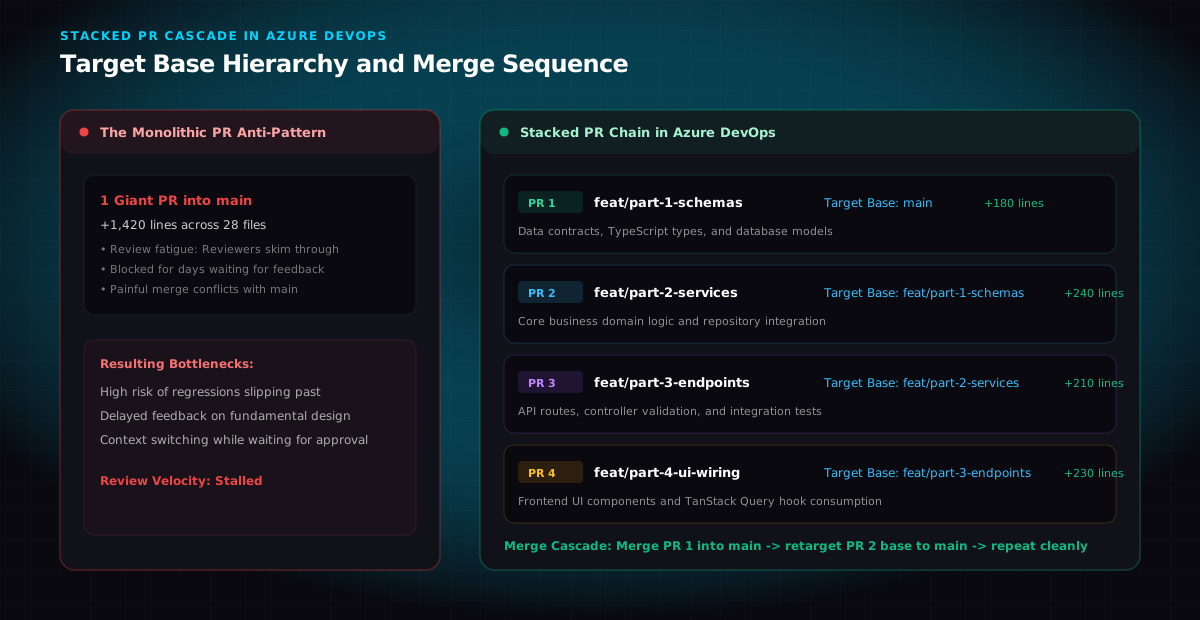
- Review Fatigue: A PR touching 30 files with over 1,200 lines of diff is rarely reviewed thoroughly. Reviewers tend to skim or delay reviewing it for days because it requires too much uninterrupted context.
- Delayed Feedback on Foundation: If your database schema or domain modeling has a flaw, you discover it only after building the services, API layer, and UI on top of it.
- Merge Conflict Hell: The longer a large feature branch lives, the more it diverges from the active
mainbranch, resulting in painful rebases.
The solution is Stacked Pull Requests: breaking a single large feature into a sequential chain of small, self-contained PRs where each PR builds on the previous one.
Step 1: Spec Slicing with Claude Code
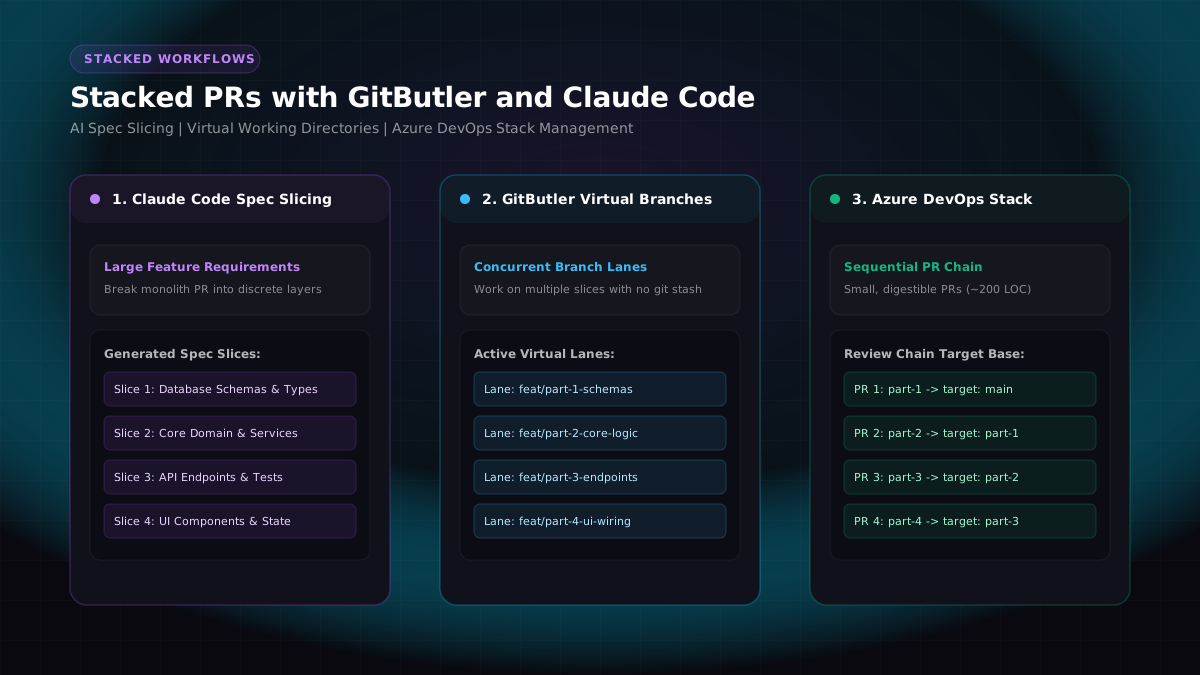
Before writing code, the feature must be decomposed into logical, incremental layers. I use Claude Code to take the overall technical specification and slice it into isolated boundaries:
text[Overall Feature Spec] | +--> Slice 1: Data Contracts, Types, and Database Migrations +--> Slice 2: Core Domain Logic and Service Layer +--> Slice 3: API Endpoints, Validation, and Integration Tests +--> Slice 4: Frontend UI Components and State Wiring
Why Spec Slicing Works
Each slice represents a verifiable milestone with clear acceptance criteria:
- Slice 1 establishes the shared contracts and type definitions without implementation noise.
- Slice 2 implements business rules and unit tests on top of those types.
- Slice 3 exposes the functionality over HTTP endpoints.
- Slice 4 builds the user interface against the tested APIs.
Because each slice is typically between 150 and 300 lines of code, code reviews become fast and focused.
Step 2: Virtual Branches with GitButler
In standard Git, working across multiple related branches simultaneously is clumsy. You constantly have to run git stash, git checkout, and rebase local branches against one another.
GitButler rethinks this with the concept of Virtual Branches.
How GitButler Works
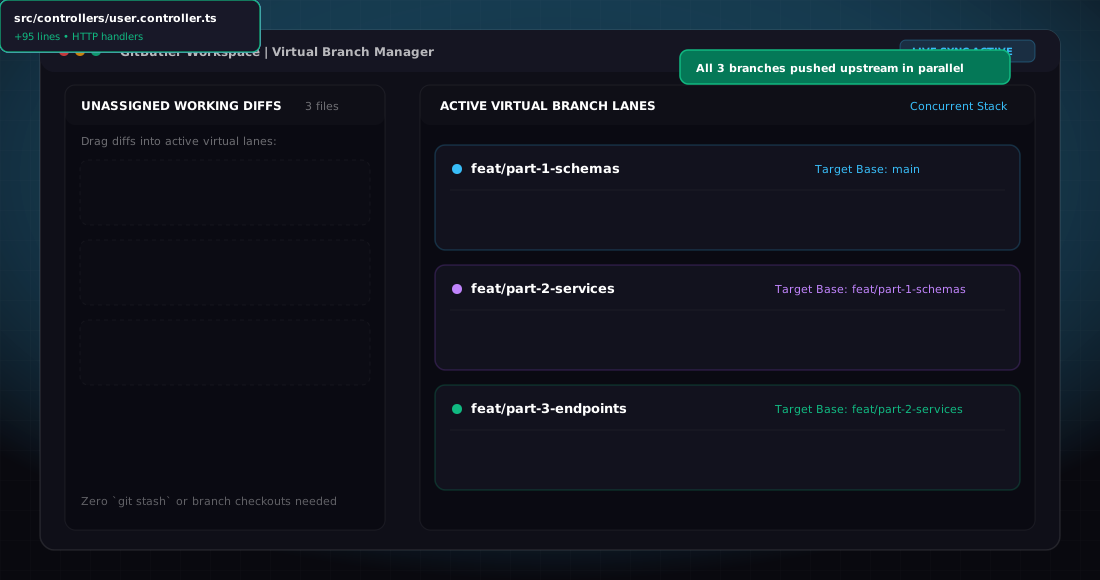
Instead of locking your working directory to a single Git branch at a time, GitButler allows you to have multiple active branch lanes concurrently in the same workspace.
textWorking Directory ├── Unassigned Changes (modified files & hunks) ├── Lane 1: feat/part-1-schemas --> tracks gitbutler/part-1-schemas ├── Lane 2: feat/part-2-services --> tracks gitbutler/part-2-services └── Lane 3: feat/part-3-endpoints --> tracks gitbutler/part-3-endpoints
- Simultaneous Working Lanes: You can write code for the API layer while simultaneously tweaking a schema type. GitButler lets you drag and drop specific file diffs or individual hunks into their respective branch lane.
- No Context Switching Overhead: You never need to stash changes or switch branch checkouts to commit a quick fix to an earlier layer in your stack.
- Direct Remote Push: Each virtual branch can be pushed directly to your remote Git repository as an independent branch.
Step 3: Managing Stacked PRs in Azure DevOps
Platforms like GitHub have third-party CLI tools (such as Graphite or Aviator) for automated stacking. In Azure DevOps (ADO), native stacked PR support is not built in, so we manage the stack hierarchy cleanly by setting the target base branches.
Setting Up the Branch Stack in Azure DevOps
When creating PRs in Azure DevOps, point each PR to its immediate predecessor instead of targeting main:
| Pull Request | Source Branch | Target Base Branch | Scope of Review | Approximate Size |
|---|---|---|---|---|
| PR 1 | feat/part-1-schemas | main | Types, schemas, and migrations | ~180 LOC |
| PR 2 | feat/part-2-services | feat/part-1-schemas | Core business logic and unit tests | ~240 LOC |
| PR 3 | feat/part-3-endpoints | feat/part-2-services | API routes and controllers | ~210 LOC |
| PR 4 | feat/part-4-ui-wiring | feat/part-3-endpoints | Frontend components and hooks | ~230 LOC |
Why This Is Essential for Reviewers
Because PR 2 targets feat/part-1-schemas, Azure DevOps displays only the diff between part-2 and part-1 (240 lines), rather than the cumulative 420 lines from main.
Reviewers can review PR 1 and PR 2 in parallel without seeing duplicate changes or being overwhelmed by the full feature diff.
The Merge Cascade: Landing Stacked PRs in Production
When code reviews are approved and CI tests pass, the stack is merged sequentially down to main:
text[PR 1: Merged into main] | v (Update base of PR 2 to main) [PR 2: Merged into main] | v (Update base of PR 3 to main) [PR 3: Merged into main] | v (Update base of PR 4 to main) [PR 4: Merged into main]
The Step-by-Step Merge Sequence
- Merge PR 1 into
main:- Complete PR 1 in Azure DevOps using your repository's standard merge strategy (such as Squash or Semi-Linear merge).
- Retarget PR 2 to
main:- Edit PR 2 in Azure DevOps and change its target branch from
feat/part-1-schemastomain. - Azure DevOps will automatically recompute the diff against
main. Because the changes from part-1 are already merged intomain, PR 2 will still only show its own isolated changes.
- Edit PR 2 in Azure DevOps and change its target branch from
- Pull
maininto Remaining Local Branches:- In GitButler or your terminal, rebase or merge
maininto your remaining branch lanes so your local workspace stays synchronized.
- In GitButler or your terminal, rebase or merge
- Repeat for PR 3 and PR 4:
- Continue the cascade until the entire stack has safely landed in
main.
- Continue the cascade until the entire stack has safely landed in
Key Benefits Observed in Practice
Adopting this stacked workflow with Claude Code and GitButler on complex features delivered concrete improvements:
- Review Turnaround: Reviews dropped from an average of 3 to 4 days down to a few hours because each PR takes under 10 minutes to review.
- Architectural Alignment: Teammates caught a missing database index in PR 1 before PR 3 and PR 4 were even ready for review, preventing costly rework.
- Cleaner Git History: Each commit in
mainrepresents a focused, bisectable unit of work rather than an opaque 1,500-line monolith commit. - Unblocked Development: You can continue building higher layers (UI, tests) without waiting for earlier PRs to merge first.
Summary Checklist for Stacked PRs
- Slice the Spec First: Use Claude Code to divide the feature into 3 to 5 logical architectural layers before coding.
- Use Virtual Branches: Assign file diffs to separate GitButler lanes to avoid stash and checkout friction.
- Set Incremental Base Branches: In Azure DevOps, target each PR to its predecessor branch to keep diffs isolated.
- Cascade the Merges: Once a base PR lands in
main, retarget the next PR in the stack tomainand continue down the chain.